RIGHT WHERE YOU NEED IT
A small app.
A brighter idea.
Open Lantern from your Mac menu bar or Windows system tray. Adjust a display, a computer, or your connected setup.
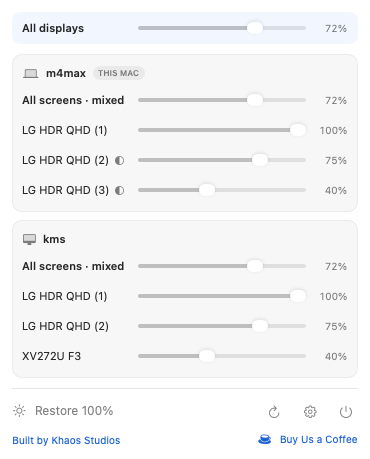 Native Mac app · Sample displays
Lantern for Mac and Windows
Control brightness on one computer.
Or bring your Macs and Windows PCs together.
A two-screen Mac. A three-screen Windows PC. All in one place.
One screen. One computer. Or everything together.
Interactive illustration. Your actual screen brightness won’t change.
ONE PLACE. EVERY DISPLAY.
A MacBook beside a Windows PC. Two Macs. A whole desk of displays. Lantern connects the computers on your local network, so brightness is always within reach.
RIGHT WHERE YOU NEED IT
Open Lantern from your Mac menu bar or Windows system tray. Adjust a display, a computer, or your connected setup.
Native Mac app · Sample displaysSAME WI-FI. MORE FREEDOM.
Enable phone control. Scan the pairing code. Adjust your screens from your browser.
Illustration. Phone control is optional. Keep the host awake and Lantern running.
MADE FOR YOUR SETUP
Built for Windows 10 or later (x64) and macOS 13 or later (Apple Silicon and Intel). Run Lantern on each computer you want to control. Compatibility testing is ongoing.
Hardware brightness depends on your monitor, cable and dock. Mac hardware DDC requires Apple Silicon. DisplayLink and other displays without hardware control can use software dimming, which darkens the image without switching off the backlight. Keep Lantern running for software dimming.
Save brightness presets across your connected computers, then apply them together. Disconnected and unavailable displays are skipped.
Use Restore in the app, or restore local displays with Ctrl + Alt + Home on Windows and Control + Option + Command + R on Mac.
Brightness control works without internet access. Connect your computers and phone on a local network you trust. Keep remote control limited to that network.
Release builds include anonymous usage analytics, on by default and controllable in Settings. They exclude computer names, display names, brightness values and pairing tokens. Analytics and update checks can use the internet.
Lantern
Get Lantern for your computer.
Windows release notes ↗